
Notion Planner Templates: 6 Best Picks for Life, Goals and School
Notion planner templates turn a blank Notion page into a ready-made system for tasks, habits, goals and notes. This list includes all-in-one life dashboards, a minimal life planner, a 12 Week Year goal planner and templates for students and teachers. Each one is duplicated into your own Notion account, so you can use it on your computer, phone or tablet and adjust it to fit your routine.
Quick Picks
- Best all-in-one life system: Digital Brain – All in One Life Planner
- Best for habits and projects: Notion Life OS Template
- Best minimal design: Minimal OS – Notion Life Planner
- Best for goals: 12 Week Year Planner Notion Template
- Best for students: Student Notion Planner & Study Hub
- Best for teachers: Teacher Planner Notion Template
Notion Planner Templates for Life and Goals
These templates organize everyday life, from daily tasks and habits to long-term goals.
1. Digital Brain – All in One Life Planner

If you want one place for almost every part of your life, this template is built around the idea of a second brain. The main dashboard brings together a goal tracker, a monthly overview calendar, a habit tracker and a daily random quote. A calm blue-toned design keeps the busy system easy on the eyes.
One click takes you to separate areas for weekly and monthly planning, finance, investments, a reading journal and health. A notes space holds ideas and brainstorming, while a lifestyle area covers travel plans, wishlists and personal projects. You receive the template link and a user guide to get started.
2. Notion Life OS Template
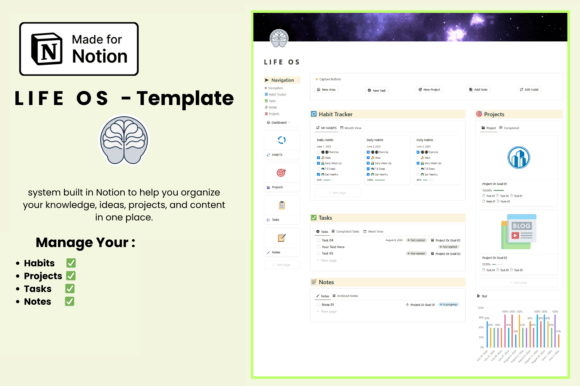
A life operating system works best when it stays simple, and this template focuses on the essentials. A habit tracker with progress bars shows how your routines are going each day. A task manager sorts to-dos by project or deadline.
A project dashboard shows visual progress for your goals, and a notes hub keeps thoughts, meeting notes and ideas together. Monthly progress charts show how consistent your habits have been over time. The clean, minimal template works with the free Notion plan and comes with instructions for duplicating it.
3. Minimal OS – Notion Life Planner

Some Notion setups get so complex that planning turns into a chore, and this one stays deliberately light. An all-in-one life dashboard holds a quick to-do list and a weekly task planner. A habit tracker and a vision board section keep long-term goals in view.
Academic planning pages make it useful for students too, and a bookmark manager saves the links you need. Small pixel and retro icon accents, a digital flip clock and progress bars give it a soft, playful look. It suits anyone who wants structure without visual clutter.
4. 12 Week Year Planner Notion Template

The 12 Week Year method treats twelve weeks as a full year, which creates a sense of urgency that annual goals often lack. This template starts with your mission and values and a vision and goals page. A brainstorm session page helps you choose what matters most.
Weekly plans, a daily planner, a daily check-in and a tasks tracker turn goals into actions. Weekly review and tracking pages, an overall results page and a next steps page close each cycle. You receive a PDF with a link to duplicate the template into your own Notion workspace.
Notion Planner Templates for School
These workspaces are built around classes, assignments and the academic calendar.
5. Student Notion Planner & Study Hub

Students often juggle several apps for classes, deadlines and grades, and this hub brings them together. A student command center links to every part of the workspace. A course and semester planner organizes your curriculum and current course load.
A class schedule shows your weekly commitments, and a smart task planner tracks assignments with views for due today, due this month and task status. An academic progress tracker covers exam prep and keeps a GPA dashboard up to date. The cozy design needs no advanced Notion skills, and you receive a PDF with a link to duplicate it.
6. Teacher Planner Notion Template

Teaching involves lessons, classes, grades and paperwork, and this workspace connects all of them. A teacher dashboard and a weekly planner give you an overview of the week. Separate sections handle lessons, assignments, assessments and tasks.
Student, class, timetable and attendance pages keep track of the people and the schedule, while curriculum and resources pages hold your materials. Goals, events, daily notes, progress tracking and an optional habit tracker help you reflect on each week. A setup center and a quick start guide are included, and it works with a free Notion account.
Notion Planner Templates at a Glance
| Template | Best for | Key features |
|---|---|---|
| Digital Brain – All in One Life Planner | Managing every area of life | Goals, habits, finance, health, reading, lifestyle |
| Notion Life OS Template | Habits and projects | Habit tracker, task manager, progress charts |
| Minimal OS – Notion Life Planner | A light, minimal setup | To-do list, weekly planner, habits, vision board |
| 12 Week Year Planner Notion Template | Reaching goals faster | 12-week goals, weekly plans, reviews |
| Student Notion Planner & Study Hub | Students | Courses, class schedule, assignments, GPA |
| Teacher Planner Notion Template | Teachers | Lessons, classes, attendance, assessments |
How to Set Up a Notion Planner
- Create a free Notion account. All of these templates work in your own workspace.
- Duplicate the template. Open the template link and use the Duplicate button to copy it into your account.
- Start with the dashboard. Add your current tasks and goals first, and leave the other sections for later.
- Delete what you do not need. Hide or remove pages that do not fit your life to keep the system simple.
- Install the app on your phone. Quick access makes it easier to add tasks and check habits during the day.
- Review once a week. A short weekly review keeps the planner up to date and useful.
FAQ
Is Notion good for planning?
Notion works well for planning if you like flexible pages, databases and different views such as lists, boards and calendars. It suits people who want tasks, notes and goals in one place. If you prefer handwriting, a printable or GoodNotes planner may feel more natural.
Can I use Notion as a planner for free?
Yes. The free Notion plan is enough for personal planning, and most planner templates, including several on this list, are designed to work with it.
How do I add a template to Notion?
Open the template link you receive, sign in to Notion and click Duplicate. The template is copied into your workspace, where you can edit it like any other page.
What is a Notion life OS?
A life OS, or life operating system, is a Notion setup that brings tasks, habits, goals, notes and projects into one connected dashboard. It acts as a central hub for planning both everyday tasks and long-term goals.
Can I use Notion templates on my phone or iPad?
Yes. Notion has apps for phones, tablets and computers, and your templates sync across all of them, so you can plan on any device.
Final Thoughts
The best Notion planner templates give you structure without making Notion harder to use. Start with one dashboard, fill in the parts you need now and add more sections as your routine grows. To learn more about the app itself, see this article on Notion.