
Digital Planners for iPad: 20 Best Picks for GoodNotes
Digital planners for iPad turn your tablet into a planner, journal and notebook that is always with you and never runs out of pages. Below you will find undated all-in-one planners for GoodNotes and Notability, themed hyperlinked planners, simple notebooks and trackers, and planners made for the reMarkable paper tablet. They suit anyone who has an Apple Pencil or stylus and wants to stop carrying paper notebooks.
Quick Picks
- Best undated all-in-one planner: Digital Planner for GoodNotes
- Best landscape layout: Digital Planner with Stickers and Covers
- Best for travel: Digital Travel Planner Bundle
- Best for self-care: Digital Self-Care Planner
- Best for night owls: Dark Mode Digital Notebook
- Best for reMarkable users: Mom Life Planner for reMarkable
Undated All-in-One Digital Planners for iPad
These digital planners for iPad cover the whole year with hyperlinked monthly, weekly and daily pages, and you can start them any time.
1. Undated Minimal Digital Planner
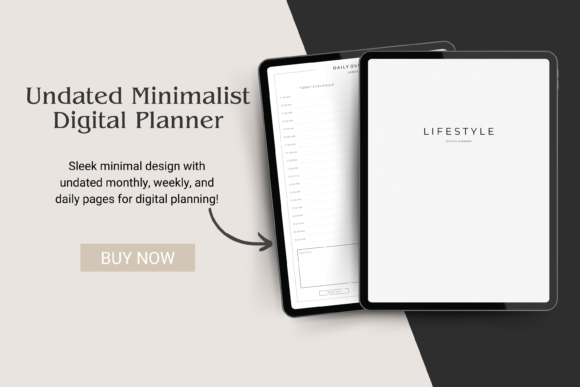
This minimal lifestyle planner keeps your iPad planning light and uncluttered. A hyperlinked index page and monthly tabs take you to any part of the year in one tap. Daily and weekly spreads are linked too, so moving between today and the week ahead is quick.
Notebook sections give you space for notes, lists and ideas alongside the calendar. Because it is undated, you can start in any month and skip weeks without leaving blank pages behind. It comes as a PDF that you import into GoodNotes as a new document.
2. Undated Daily Digital Planner

This fully hyperlinked daily planner is undated, so you can fill in the dates for any year and reuse it. Two versions are included, one with a Sunday start and one with a Monday start. That small choice matters more than it seems when your week feels off from day one.
Calendar stickers and 16 widget stickers come as separate PNG files, which makes it easy to date pages and add visual cues. A short manual explains how to set up the planner. It works in GoodNotes, Notability, Xodo and Noteshelf on iPad or Android tablets.
3. Undated Digital Daily Life Planner

This hyperlinked planner follows the classic structure of calendar, yearly overview, monthly, weekly and daily pages. Everything uses a Monday start, which suits work-week planning. The layout is simple enough to learn in a few minutes.
Four extra templates and a blank section page give room for lists, notes or a project you want to track. Several cover options let you change the look whenever you like. It is designed for GoodNotes, Notability and Xodo on an iPad with an Apple Pencil.
4. Digital Planner with Stickers and Covers

This horizontal planner suits people who like a wide landscape layout on the iPad. Monthly tabs jump to any month, and category tabs inside each month lead to reviews, a daily planner, habit tracker, finances and more. It is undated, so the same file can be used year after year.
Beyond the calendar it includes monthly expenses, a debt payment tracker, savings and budget pages, a daily food journal, a health tracker and a weekly fitness plan. Thirty-two covers and a set of PNG stickers let you change the style whenever you want. Notebook pages come in lined, dotted, grid and blank versions.
5. Minimalist Digital Planner
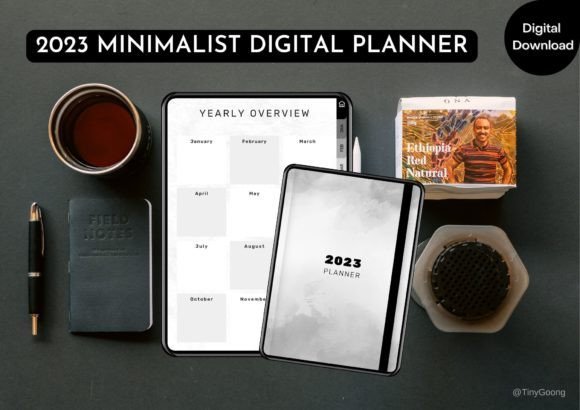
This undated planner is made only for tablet use, with clickable tabs and buttons on every page. A homepage, calendar, vision page and yearly overview set the bigger picture. Monthly, weekly and daily logs then turn that picture into tasks and appointments.
A habit and mood tracker sits next to an income and expense tracker, so money and wellbeing share one place. You can add more daily pages whenever you need them. It works in GoodNotes, Notability, Noteshelf and Xodo on iPad or Android.
6. Digital Planner for GoodNotes

This 70-page undated planner is split into eight hyperlinked sections, so each part of life has its own tab. Monthly, weekly and daily pages sit alongside weekly routine checklists and daily to-do lists. You can add more pages whenever a section fills up.
Inside you will find a vision board, a 21-day habit tracker, a self-care plan, a monthly budget, a debt snowball tracker and a no-spend challenge. Health pages include a fitness planner, meal planner, medication tracker and workout log. Cleaning schedules, a reading journal, a gift idea list and a travel itinerary round out the set.
7. Digital Undated Planner for GoodNotes

With 122 hyperlinked pages in portrait mode, this planner gives plenty of room for a full year. It opens with a distinctive Egyptian-style cover and twelve linked monthly pages. Weekly pages use a Monday start.
Sections for appointments, budget, journal and notes keep different parts of life apart. A birthday reminder section and a shopping list section help with everyday details. Graph, dotted, lined and blank pages make it useful as a notebook too.
Themed Hyperlinked Planners
If you want a planner built around one part of life, these newer themed planners use clickable tabs for travel, self-care, growth and more.
8. Digital Travel Planner Bundle

This 39-page hyperlinked travel planner keeps every trip detail on your iPad, from the first idea to the flight home. Destination sheets, a multi-trip overview and a list of trips to take this year help you plan ahead. Daily and weekly itinerary pages turn the plan into a day-by-day schedule.
Budget pages compare planned and actual spending, and transport, hotel and flight trackers keep confirmations in one place. A packing list, pre-trip checklist and to-buy list make departure day calmer. It is editable in Canva and works in GoodNotes and Notability.
9. Digital Self-Care Planner
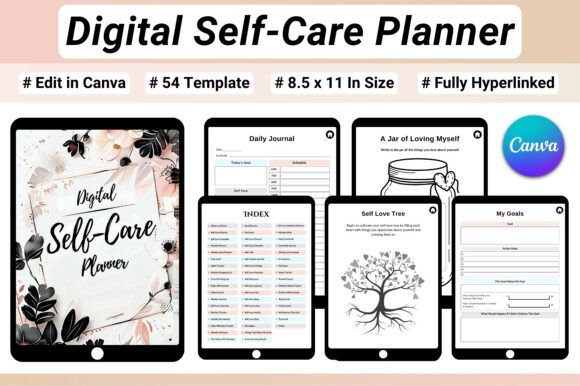
This 54-page planner builds a daily self-care routine you can follow on your iPad. A daily self-care planner and a wellness tracker for mood, water and energy keep the basics in view. Morning and evening routine trackers help healthy habits stick.
Self-love pages, a healthy boundaries worksheet and emotional awareness prompts support the inner work, while a 30-day gratitude challenge adds a daily positive habit. Sleep, period and meal tracking pages cover practical health. It is a hyperlinked US Letter PDF, editable in Canva with a Pro account.
10. DIVINE Digital Planner

This undated planner has a high-glam editorial look with rich purple tones and soft feminine details. It is designed for women who want their planner to feel inspiring every time they open it. Monthly and weekly layouts keep goals and tasks organized.
Reflection and goal-setting pages make room for bigger plans, and notes sections hold everything else. Hyperlinked tabs remove the need for endless scrolling. It works in GoodNotes, Notability, Penly and similar apps; editing the design itself may require Canva Pro.
11. Digital Life Coaching Journal
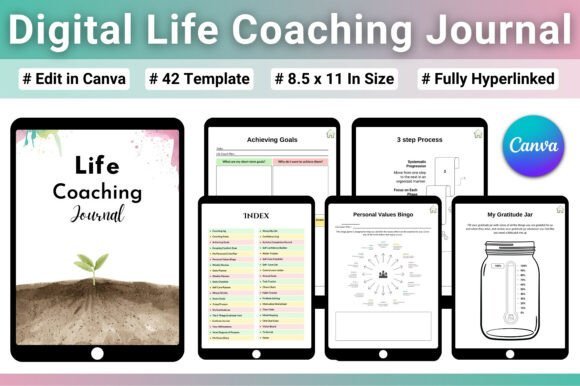
This 42-page journal works like a pocket coach on your iPad. Goal pages include SMART goals, the WOOP method and a vision board, so big plans become concrete steps. A coaching session log and weekly reviews help you see progress over time.
Confidence pages, a comfort zone worksheet and a personal values exercise support self-growth. Daily and weekly planners, a habit tracker and a chore chart keep everyday tasks on track. A stress diary and self-care pages make it a balanced tool rather than a productivity push.
12. Digital Moon & Astrology Journal

This 42-page journal is made for anyone who likes to plan with the lunar cycle. New moon intention pages and full moon gratitude pages give each phase a clear purpose. A lunar calendar and key dates page keep the cycle in view.
Birth chart pages explore your sun, moon and rising signs, and trackers cover retrogrades, transits and eclipses. Energy and mood tracking help you notice patterns across the month. It is a hyperlinked US Letter PDF for GoodNotes or Notability.
13. Zen in 10 Digital Planner
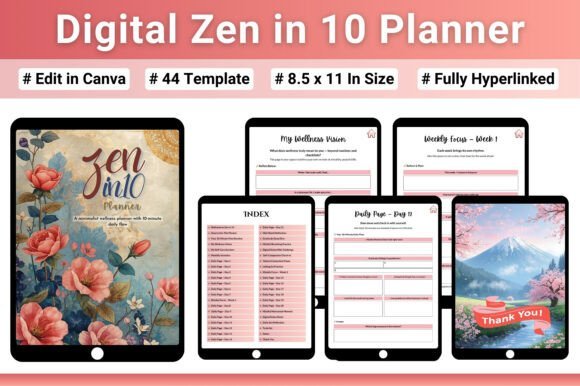
This 44-page planner is built around a simple idea: ten calm minutes a day. A daily mindfulness flow and 21 days of reflection pages guide you through short, repeatable sessions. Weekly focus pages and monthly intentions keep the practice moving forward.
Gratitude and self-care exercises, breathing practices and self-compassion pages support a quieter mind. Digital detox challenges are a thoughtful touch for a planner that lives on a screen. It is a hyperlinked US Letter PDF with a Canva template that needs a Pro account to edit.
Digital Notebooks, Journals and Trackers
Not everyone needs a full planner, and some of the most useful digital planners for iPad are simple notebooks and single trackers.
14. Habit Tracker for iPad GoodNotes

This modern habit tracker lets you follow up to 12 habits or goals on one landscape page. It is a simple way to add tracking to the iPad planner you already use. Seeing a whole month of check marks is a strong motivator.
Six PDF versions are included in white, cocoa, champagne, matcha and smokey blue, plus a dark mode version. Each file is US Letter size and designed for tablet use. It works in GoodNotes 5, Notability, Xodo and similar apps.
15. Digital GoodNotes Journal – Art Deco
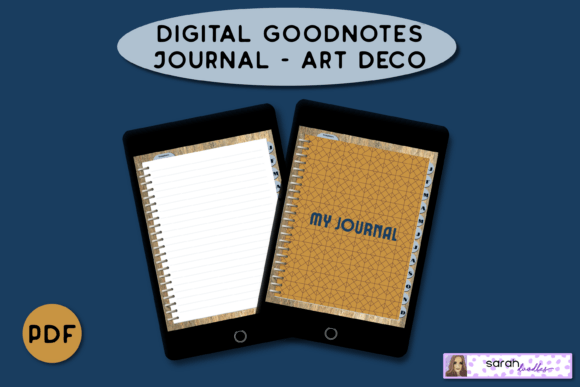
This undated journal brings an elegant Art Deco look to your iPad. Tabs link to a divider for each month, so it is easy to find past entries. Five pages per month keep the file light, and you can add more lined pages from the same template.
Brain dump templates are included and can be duplicated whenever your head feels full. It suits daily journaling, notes or a simple diary. It works in GoodNotes, Notability and Xodo on an iPad with an Apple Pencil.
16. Dark Mode Digital Notebook for iPad
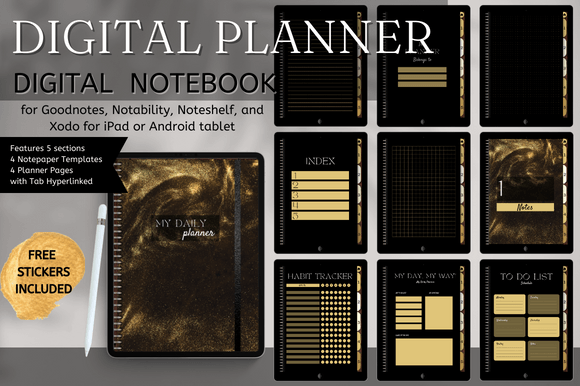
This 74-page notebook uses dark pages with a black and white floral design, which is easier on the eyes at night. Five hyperlinked tabs organize notes so each page is only one or two taps away. Eight page templates include lined, grid, dotted and dash layouts.
Ten covers and 34 gold digital stickers let you personalize the notebook from the start. It works well for lecture notes, meeting notes or a simple planner. It is designed for GoodNotes, Notability, Noteshelf or Xodo with a stylus.
17. Brain Dump Digital Notebook
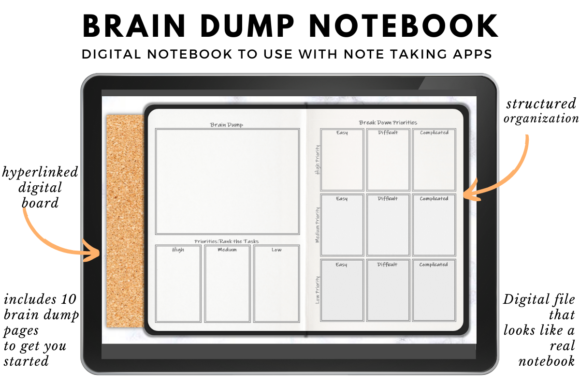
When your head is full of tasks and ideas, this notebook gives them one place to land. It includes a short guide that explains how the brain dump method helps you sort priorities. Ten starter pages get you going right away.
You can duplicate pages in your note-taking app for unlimited brain dumps. A blank page is included for free notes or stickers. It works in GoodNotes, Noteshelf, Xodo and Notability on a tablet or phone with a stylus.
Planners for reMarkable Tablets
If you prefer an e-ink screen to an iPad, these templates are made for the reMarkable 2.
18. Teacher Planner for reMarkable 2

This undated planner is designed for teachers who use a reMarkable 2 paper tablet. It covers lesson planning, note-taking and attendance tracking in one minimalist system. Because it is undated, you can start at any point in the school year.
The clean layout suits the e-ink screen and keeps pages easy to read. It brings the feel of a paper planner without stacks of notebooks. It is a practical choice for teachers who want fewer distractions than an iPad.
19. Mom Life Planner for reMarkable
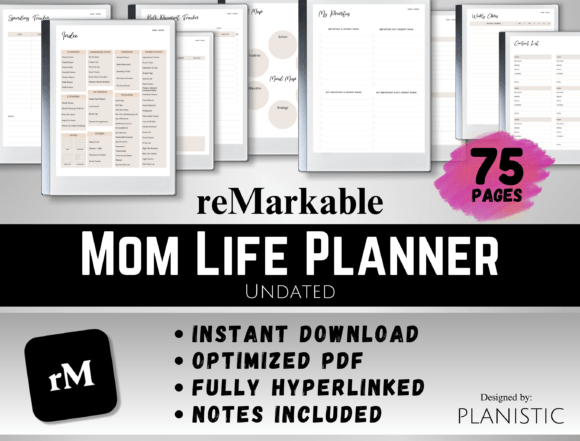
This undated planner brings family life onto a reMarkable 2. A productivity planner keeps tasks, appointments and priorities in a structured layout. Wellness and fitness pages make room for your own health.
Cleaning, nutrition and finance planners cover the household side, from chores to family dinners and budgets. A notes section captures everything else. The minimalist design suits the calm, paper-like screen of an e-ink tablet.
20. reMarkable 2 Weight Loss Planner
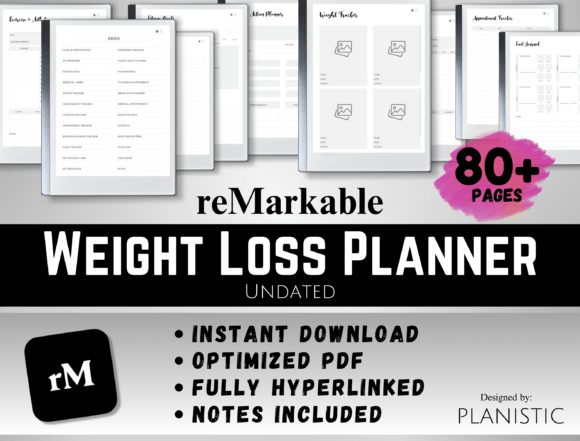
This hyperlinked planner turns a reMarkable 2 into a fitness and nutrition log. A weight tracker, exercise tracker and workout planner keep training in one place. A measurement tracker and running or walking tracker show progress beyond the scale.
A food journal and meal planner support everyday eating habits, and a medication tracker is included too. Everything sits in one digital space instead of several notebooks. As with any health goal, it is wise to agree on targets with your doctor.
Digital Planners for iPad at a Glance
| Type | Best for | Key features | Format |
|---|---|---|---|
| Undated all-in-one planners | Planning the whole year | Hyperlinked monthly, weekly and daily pages, trackers, notes | PDF for GoodNotes, Notability, Xodo, Noteshelf |
| Themed hyperlinked planners | Travel, self-care, growth, spirituality | Clickable index, focused trackers and guided pages | Hyperlinked PDF; most editable in Canva |
| Notebooks, journals and trackers | Notes, journaling, single habits | Lined, grid and dotted pages, monthly tabs, habit grids | PDF for note-taking apps |
| reMarkable planners | E-ink tablet users | Minimal layouts for teachers, family and fitness | Templates for reMarkable 2 |
How to Choose Digital Planners for iPad
- Check your app first. Most planners here work in GoodNotes and Notability; reMarkable templates are made only for that device.
- Choose undated if you start mid-year. Undated planners let you begin any month and reuse the file next year.
- Look for real hyperlinks. Clickable tabs save time; remember to switch to read-only mode in GoodNotes so links work.
- Pick portrait or landscape. Landscape layouts give wide weekly spreads, while portrait feels closer to a paper planner.
- Keep the file size in mind. Very large planners can slow down older iPads; smaller files feel faster.
- Start with fewer sections. Use the pages you need and add trackers later instead of filling everything on day one.
FAQ
How do I use a digital planner on my iPad?
Open the PDF file in a note-taking app such as GoodNotes or Notability, import it as a new document, then write on the pages with an Apple Pencil or your finger. Tap the tabs to jump between months and sections. You can duplicate pages whenever you need more.
Do I need an Apple Pencil for a digital planner?
It is not required, but it makes handwriting much more comfortable. You can also type with the text tool or use a cheaper compatible stylus. Many people start with a finger and add a pencil later.
Why are the hyperlinks not working in GoodNotes?
In GoodNotes, links only work when you are in read-only mode, not while the pen tool is selected. Switch to read-only, tap the tab, then switch back to the pen to write. Some apps need a recent update for hyperlinks to work smoothly.
Can I use a digital planner on an Android tablet?
Yes. Most PDF planners work in Android apps such as Xodo, Noteshelf and Samsung Notes. The experience is similar, although each app handles links and page duplication a little differently.
Is a digital planner better than a paper planner?
It depends on how you like to work. A digital planner is lighter, searchable and easy to reuse, while paper can feel more relaxing and has no screen distractions. Many people use an iPad planner for work and keep a small paper journal for personal notes.
Final Thoughts
The best digital planners for iPad are the ones you will actually open every morning. Start with one undated planner or a single tracker, set up the sections you need, and let your system grow from there. If you are new to the format, this overview of the personal organizer shows how planning tools have evolved.


3 Comments