Productivity Planners: 14 Best Digital Picks for 2027
Productivity planners help you decide what matters, plan when it will happen and see what you actually got done. This list brings together hyperlinked digital planners for GoodNotes, 2027 yearly and monthly printables, goal and focus planners, and simple Canva templates for daily and weekly planning. They suit students, remote workers, busy parents and anyone who wants calmer, more focused days in 2027.
Quick Picks
- Best all-in-one planner for 2027: All-in-One Digital Planner 2027
- Best for long-term planning: 2027–2030 Monthly Planner Printable
- Best for ADHD focus: ADHD Productivity Planner for Women
- Best for meetings: Meeting Planner – Printable & Digital
- Best simple weekly page: Minimal Weekly Planner Template
Hyperlinked Productivity Planners for GoodNotes
These digital planners use clickable tabs, so moving between your year, month, week and day takes one tap.
1. All-in-One Digital Planner 2027

With 655 hyperlinked pages, this planner is built for people who want their whole year in one file. It starts with a 2027 year at a glance, yearly goals and a vision board, then moves through monthly, weekly and daily layouts. Daily pages include time blocking, top priorities and a to-do list, so every morning starts with a clear plan.
Budget pages, a bill tracker, a savings challenge and an expense log sit next to meal, workout, sleep and mood trackers. It works in GoodNotes, Notability, Noteshelf, Xodo, Samsung Notes and other PDF annotation apps. Large files run more smoothly with a paid GoodNotes plan, so check your app before you start.
2. Undated Digital Planner
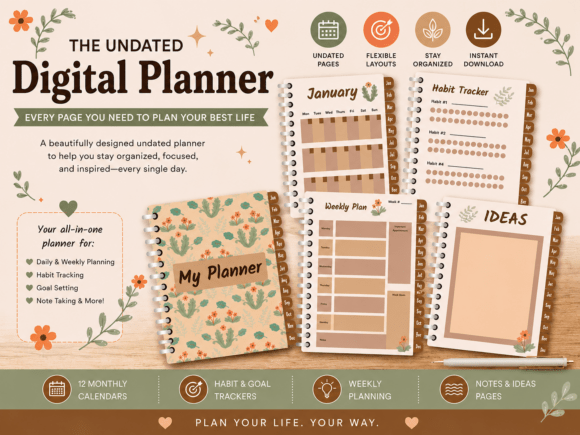
This undated planner suits anyone who wants a calm, cozy system without the pressure of fixed dates. Monthly calendars and weekly pages keep your schedule in order, while goal and habit pages help you focus on what matters. Brainstorm and idea pages give creative thoughts a home instead of a sticky note.
Hyperlinked tabs move you between sections in one tap, and you can duplicate pages as often as you like. Because there are no dates, you can start in any month and reuse the planner year after year. It works in GoodNotes, Notability, Noteshelf, Xodo and Samsung Notes on iPad, Android and Windows tablets.
3. Hedgehog Digital Planner with Hyperlink
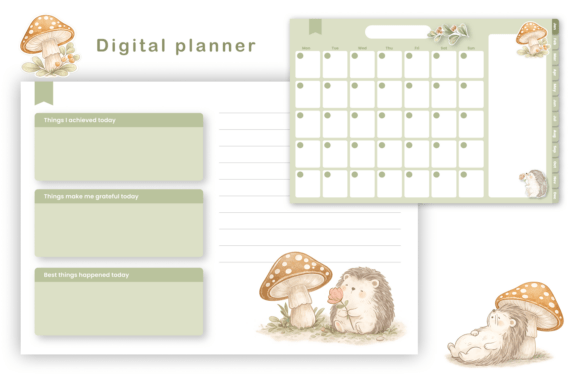
Planning feels lighter when the pages make you smile, and this woodland planner is decorated with watercolor hedgehogs, botanical details and warm earthy tones. It suits students, professionals and anyone who stays more consistent with a planner they enjoy opening. The gentle style also works well for people who find busy layouts stressful.
Layouts are clean and minimal, leaving plenty of room for handwriting. Fully hyperlinked tabs take you to each section quickly. It is undated, so you can begin any day, and it is designed for GoodNotes, Notability and other PDF planner apps.
4. Shiba Inu Goodnotes Digital Planner

Soft blue pages, watercolor Shiba Inu illustrations and little teacup and dessert accents give this planner a cheerful, cozy feel. The monthly overview has spacious daily boxes, so appointments and deadlines are easy to see at a glance. Week navigation tabs take you straight from the month to the week you need.
Weekly planning pages and lined note sections hold tasks and ideas. A Daily Reflection spread lets you record achievements, gratitude and highlights, which helps you notice progress on busy weeks. It is made for GoodNotes and suits dog lovers who want planning to feel a bit more personal.
2027 Yearly and Monthly Planners
Printable planners for 2027 keep the big picture in view and work well in a binder or on a tablet.
5. 365 Day Printable Planner Canva PDF

This colorful 2027 planner has 120 pages that cover the whole year, from a year at a glance and yearly goals to monthly calendars and weekly planning. Monthly goals and priorities pages help you choose what to focus on before the month begins. It works well as a printable binder for home, school or a small business.
Practical extras include an income tracker, an expense tracker, a password tracker, a birthday tracker and important dates pages. The template is fully editable in Canva, and you do not need Canva Pro to change colors, fonts, text or layout. It comes as a US Letter PDF that you can print as many times as you need.
6. 2027 Monthly Planner Printable

A monthly view is often all you need to keep work and family dates under control, and this 2027 planner gives each month a full two-page spread. A year calendar and yearly goals page sit at the front, so big plans stay visible. A personal information page and a Remind Me section help you capture things that are easy to forget.
Contacts pages, a password tracker and notes and ideas pages turn it into a small organization system. The clean layout has printer-friendly margins and is supplied as high-resolution PDF and PNG files at 300 dpi. You can print it or import it into GoodNotes or Notability.
7. 2027–2030 Monthly Planner Printable

If you like to think ahead, this planner covers four full years, from January 2027 to December 2030. Each month has its own two-page spread with space for notes and important dates. It is useful for long projects, study programs, renovation plans or anything that stretches past one calendar year.
The minimalist layout keeps the calendar easy to read at a glance. Files come as high-resolution PDF and PNG at 300 dpi with professionally aligned print margins. Use it as a printed binder or open it in GoodNotes, Notability and other planner apps.
Goal, Focus and Meeting Planners
Some of the most useful productivity planners focus on one job: setting goals, protecting focus or running better meetings.
8. Intentions & Goals Planner
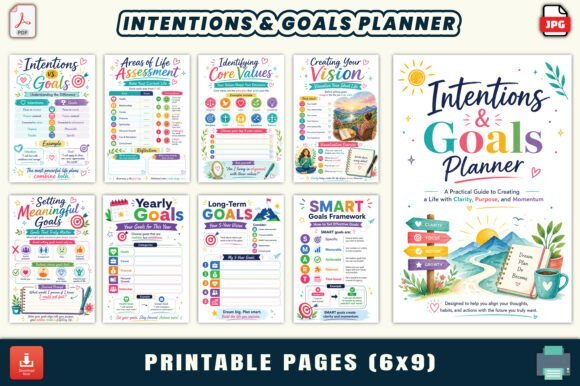
Productivity is easier when you know why you are doing the work, and this planner starts there. Goal-setting worksheets and long-term vision pages help you define what you want, and daily intention pages turn that into a small focus for each day. Mindset exercises and reflection prompts make it a good fit for personal development.
Weekly and monthly planning templates, habit trackers and time management pages keep the plan practical. Gratitude and self-care sections add balance so goals do not turn into burnout. It has 30 pages in a 6 x 9 inch format, supplied as JPG and PDF files for printing or digital use.
9. ADHD Productivity Planner for Women

Standard planners can feel overwhelming for an ADHD brain, and this 30-page planner is designed to work with it instead. Brain dump pages clear mental clutter first, then a daily priority planner and task breakdown worksheets turn big jobs into small steps. A time blocking page and a focus session log help you protect your attention.
A distraction tracker, an energy tracker and a hyperfocus planner show when you work best. Quick wins, a midday reset page and a reward system keep motivation up on hard days. The pages are 6 x 9 inches in JPG and PDF, ready to print or import into GoodNotes or Notability.
10. Meeting Planner – Printable & Digital

Meetings eat up time when there is no plan, and this planner gives every meeting a clear structure. An agenda template, attendee list and objectives section prepare you before it starts. Notes and discussion points keep the conversation on track while it happens.
Action items and follow-up tasks with deadlines make sure decisions turn into results. It suits managers, remote teams, client calls, student group work and even family meetings. You get printable PDFs in A4 and US Letter plus a hyperlinked digital version for GoodNotes and Notability.
Simple Canva Templates for Daily and Weekly Planning
If you prefer one clean page instead of a full planner, these editable templates are quick to set up.
11. Botanical Daily Weekly Monthly Planner

This set covers the three planning views most people use: a daily page, a weekly page and a monthly page. Soft botanical illustrations give the pages a fresh, calm look that suits a home office or study desk. Having all three in one style keeps a printed binder neat and consistent.
The pages come as JPG, PNG and PDF files in A4, A5 and US Letter sizes, so they fit most binders and planners. A Canva template link lets you edit colors, fonts and layout, and it works with a free Canva account. Print them directly or use them on a tablet.
12. Minimal Weekly Planner Template | Canva
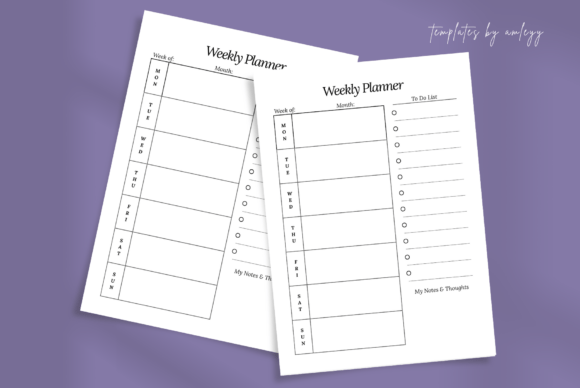
Weekly planning is one of the simplest productivity habits, and this clean template makes it easy to start. One page shows the whole week, with room for tasks, schedules and goals. The uncluttered design keeps attention on what needs to happen rather than on decoration.
The template opens in Canva, where you can change text, colors and layout in a few minutes with a free or Pro account. Use it as a digital weekly planner on a tablet or print a fresh copy each Sunday. It suits students, professionals and anyone who prefers a minimal look.
13. Modern Digital Work Planner Template

Designed for the workday, this sleek planner helps you manage your schedule, set priorities and track tasks in one place. It works for project planning, meeting prep and organizing a weekly workload. The modern, minimalist style looks professional on a desk or on a tablet screen.
Everything is editable in Canva, so you can match the colors to your brand or office style. You receive a PDF with a direct Canva link and a PNG version. Use it digitally or print it for a tidy office planner.
14. Sleek Digital Daily Planner Template

A good daily page answers three questions: what matters today, when will it happen and what is next. This sleek daily planner is built for that kind of focused routine, with a minimalist and sophisticated look. It suits students, professionals and entrepreneurs who want a consistent start to each day.
The template is editable in Canva, so you can adjust sections to fit your own routine. It comes as a PDF with a Canva access link plus a PNG preview. Print it at home or use it on an iPad or other tablet for daily planning.
Productivity Planners at a Glance
| Type | Best for | Key features | Format |
|---|---|---|---|
| Hyperlinked digital planners | Planning everything on a tablet | Clickable tabs, monthly, weekly and daily pages, trackers | PDF for GoodNotes, Notability and other apps |
| 2027 yearly and monthly planners | Seeing the whole year or several years | Year at a glance, monthly spreads, goals, contacts | Printable PDF and PNG, some editable in Canva |
| Goal, focus and meeting planners | One clear productivity goal | Goal worksheets, focus logs, meeting agendas | Printable PDF and JPG, digital versions |
| Canva templates | A simple daily or weekly page | One clean layout you can customize | Canva template, PDF and PNG |
How to Choose a Productivity Planner
- Start with your main problem. If you forget deadlines, choose a strong monthly view; if your days feel chaotic, choose a daily page with time blocks.
- Pick digital or paper honestly. A tablet planner is always with you, while a printed page on your desk is harder to ignore.
- Look for priorities, not just lists. A top-three priorities box helps more than a long to-do list.
- Plan weekly, review weekly. Ten minutes on Sunday to plan and look back is where most of the benefit comes from.
- Keep it small at first. Use the pages you need and ignore the rest until the habit sticks.
- Match the planner to your brain. Brain dump pages, energy trackers and short focus sessions help if traditional planners never worked for you.
FAQ
What is a productivity planner?
A productivity planner is a planner built around priorities and focus rather than just appointments. It usually includes goal pages, a daily priority list, a schedule or time blocks, and a space to review what you finished. The aim is to spend time on the tasks that matter most.
How do you use a productivity planner?
Set a few goals for the month, then choose weekly priorities that support them. Each morning, pick your top three tasks and give them time on your schedule. At the end of the day or week, review what worked and move unfinished tasks forward.
What is time blocking?
Time blocking means giving each task its own block of time in your calendar instead of working from an open list. It protects focus and makes it obvious when a day is overbooked. Many daily planners include an hourly schedule for this.
Is a digital or paper planner better for productivity?
Neither is better for everyone. Digital planners are easy to carry, search and reuse, while paper planners can feel more focused because there are no notifications. Choose the one you will actually open every day.
How do I plan my week to be productive?
Look at fixed appointments first, then choose three to five priorities for the week. Spread them across the days and leave some free time for surprises. A short weekly review helps you plan the next week better.
Final Thoughts
The best productivity planners are simple enough to use every day and flexible enough to grow with you. Start with one planner or template, plan your week on Sunday and choose three priorities each morning. For background on the methods behind many of these planners, see this article on time management.


5 Comments