Budget Spreadsheets: 8 Best Google Sheets and Excel Templates
A budget spreadsheet does the math for you: enter your income and spending, and formulas update totals, dashboards and savings rates as you type. This list includes Google Sheets and Excel budget templates for monthly budgets, the 50/30/20 rule, biweekly paychecks, couples and shared bills, plus an all-in-one planner with net worth and cash flow.
Quick Picks
- Best simple Google Sheet: Budget Planner for Google Sheets
- Best for couples: Couple Budget Planner Template – Light
- Best 50/30/20 dashboard: 50 30 20 Budget Planner Template Dark
- Best biweekly spreadsheet: Biweekly Paycheck Budget Spreadsheet
- Best for net worth: All-in-One Financial Planner & Budget
Monthly Budget Spreadsheets
Track a full year of budgets with dashboards that update automatically.
Best Simple Google Sheet
1. Budget Planner for Google Sheets

Format: Google Sheets
Sheets: 12 months + annual summary
Best for: people who want to enter a month on one page
- Portal page for monthly entry
- 12 monthly sheets saved automatically
- Annual summary dashboard
Save and Save + Next buttons move your numbers into the right month without hunting through tabs. It is built for Google Sheets on a computer.
Best Dark Mode Sheet
2. Monthly Budget Planner Dark Version

Format: Google Sheets
Tabs: 19
Best for: people who prefer dark screens
- Monthly dashboards and annual summaries
- Budget vs actual and transactions log
- Sinking funds, savings goals and subscription tracker
- Automated calendar for scheduled transactions
The automated calendar shows upcoming bills by date, so nothing slips. A dark theme is easy on the eyes during evening money check-ins.
Best for Net Worth
3. All-in-One Financial Planner & Budget

Format: Interactive HTML + Excel
Works: Offline, multi-currency
Best for: people who want a full picture beyond monthly spending
- Balance sheet with net worth
- Monthly income statement and cash flow statement
- Zero-based budget and debt payoff with real timelines
- Savings goals, subscription audit and live dashboard
Household versions of real financial statements show how money moves, not just where it goes. Everything works offline without an account.
50/30/20 Budget Spreadsheets
Split income into needs, wants and savings without doing the math by hand.
Best 50/30/20 Dashboard
4. 50 30 20 Budget Planner Template Dark

Format: Google Sheets
Tabs: 20
Best for: people following the 50/30/20 rule
- Needs 50%, wants 30% and savings 20% tracking
- 12 monthly dashboards and an annual dashboard
- Sinking funds, savings goals and subscriptions
- Automated calendar and recurring transactions
Every expense is sorted into needs, wants or savings, so you see your balance at a glance. Use it for any year and any currency.
Best Quick-Start Sheet
5. 50/30/20 Budget Spreadsheet

Format: Google Sheets, Excel, Numbers
Tabs: 4
Best for: anyone who wants a 50/30/20 budget running in minutes
- Budget tab with formulas already written
- Dashboard with savings rate and monthly income
- Start Here guide and sample data
Sample data shows how it works before you type your own numbers. It opens in Google Sheets, Excel and Apple Numbers.
Paycheck and Couples Budget Spreadsheets
Budget by payday or share costs fairly with a partner or roommate.
Best Biweekly Spreadsheet
6. Biweekly Paycheck Budget Spreadsheet
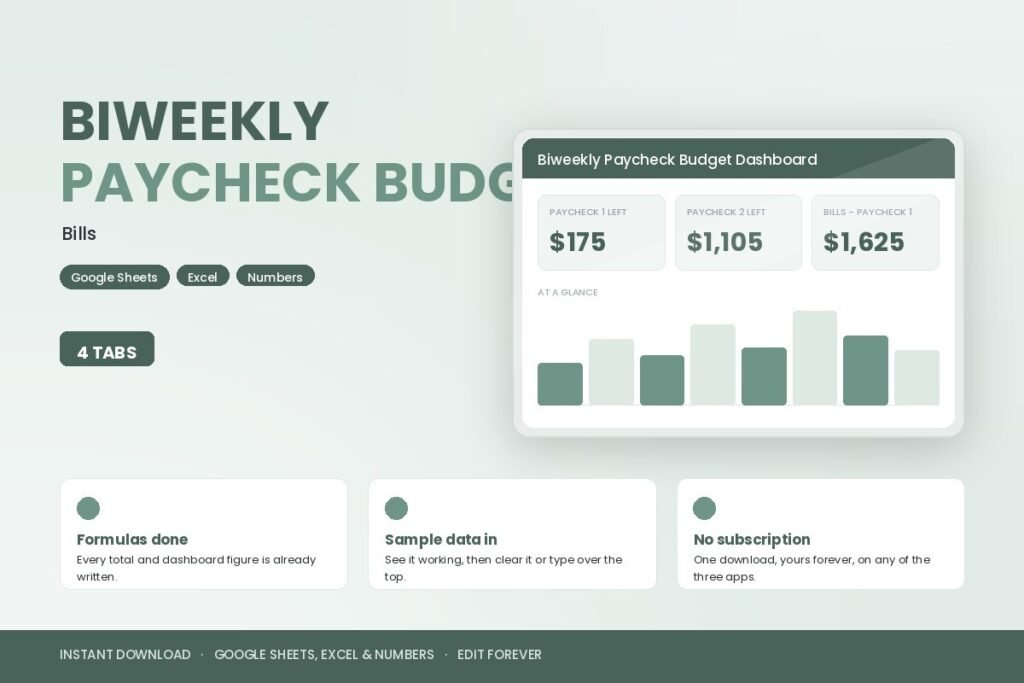
Format: Google Sheets, Excel, Numbers
Tabs: 4
Best for: people paid every two weeks
- Bills assigned to paycheck 1 or paycheck 2
- Dashboard with money left from each paycheck
- Start Here guide and sample data
Seeing what is left from each paycheck stops the end-of-month squeeze. Formulas are ready, so you only enter your bills and pay.
Best for Couples
7. Couple Budget Planner Template – Light

Format: Google Sheets
Tabs: 20
Best for: couples who share some costs and keep others separate
- Person 1, Person 2, 50/50 or income-based splits
- 12 monthly dashboards and an annual dashboard
- Sinking funds, savings goals and investments
- Works with any currency and any year
Income-based splits are fairer when partners earn different amounts. Each transaction can be marked as shared or personal.
Best Bill Splitter
8. Couples Budget Bill Splitter Spreadsheet

Format: Google Sheets, Excel, Numbers
Tabs: 4
Best for: roommates or couples settling shared bills
- Shared expenses list
- Dashboard with each share and amount to settle up
- Start Here guide and sample data
The settle-up figure ends the question of who owes whom. It works for partners, roommates or friends sharing a trip.
Budget Spreadsheets at a Glance
| Type | Best for | Key features | Works in |
|---|---|---|---|
| Monthly budget sheets | A full year of tracking | Dashboards, budget vs actual, calendar | Google Sheets, Excel, HTML |
| 50/30/20 sheets | Simple rule-based budget | Needs, wants and savings split | Google Sheets, Excel, Numbers |
| Paycheck sheets | Biweekly pay | Bills by paycheck, money left | Google Sheets, Excel, Numbers |
| Couples sheets | Shared costs | 50/50 or income-based split, settle-up | Google Sheets, Excel, Numbers |
How to Use a Budget Spreadsheet
- Make your own copy. Save the template to your Google Drive or computer first.
- Set up categories. Rename them to match your real bills and spending.
- Enter fixed costs once. Use recurring transactions where the sheet offers them.
- Log spending weekly. Copy totals from your bank app every few days.
- Check the dashboard. Look for categories that keep going over.
- Back it up. Keep a copy in case a formula gets deleted by mistake.
FAQ
Is Google Sheets or Excel better for budgeting?
Google Sheets is free, works in a browser and is easy to share with a partner. Excel works offline and has more advanced features. Check which program each template supports before choosing.
What is the 50/30/20 rule?
It splits take-home pay into 50 percent for needs, 30 percent for wants and 20 percent for savings and extra debt payments. Many people adjust the percentages to fit their costs.
How do couples split expenses fairly?
Some couples split shared bills 50/50, while others split them in proportion to income so each person pays the same share of what they earn. A couples budget spreadsheet can calculate either way.
Are budget spreadsheets safe to use?
Templates in Google Sheets or Excel store your data in your own account or on your computer. Avoid typing full account numbers or passwords into any spreadsheet, and only share it with people you trust.
When should I talk to a financial professional?
A planner helps you organize money, but it is not financial advice. If you are behind on payments, considering bankruptcy or debt consolidation, or planning big investments or retirement, talk to a qualified financial adviser or a nonprofit credit counselor.
Final Thoughts
A budget spreadsheet is the easiest way to see your money clearly without a calculator. Pick a monthly sheet for full-year tracking, a 50/30/20 template for a simple rule, a biweekly sheet if you are paid every two weeks or a couples template for shared costs. For background on spreadsheets themselves, see this article on spreadsheets.