

Digital Planners for Freelancers: 15 Best Picks for 2027
Digital planners for freelancers keep clients, projects, invoices and taxes in one place, so you spend less time chasing details and more time doing paid work. In this list you will find client and project planners, all-in-one and 2027 business planners, money and tax trackers, and simple daily planners for working from home. They suit designers, writers, virtual assistants, consultants and anyone who works for themselves.
Quick Picks
- Best for managing clients from start to finish: Small Business Client & Project Planner
- Best for Notion users: Freelance Client & Project CRM
- Best for planning 2027: 2027 Creator Business Planner
- Best for tracking client payments: Client Payment Tracker Template
- Best for freelancers who drive to clients: 2027 Mileage Planner
- Best for a simple home-office day: Work from Home Planner
Client and Project Planners
These digital planners for freelancers focus on the work itself: briefs, scope, deadlines and client communication.
1. Small Business Client & Project Planner

This 20-page planner follows a client from first contact to the final handover. It starts with a client profile, a lead tracker and a client discovery page, then moves into a project brief, scope of work and goals with success metrics. Writing the scope down early makes it much easier to say no to extra work that was never part of the deal.
A project dashboard, deliverables tracker, timeline and milestones keep each job on schedule, while meeting notes and a client communication log record what was agreed. Feedback and revisions pages, an expense tracker and an invoice and payment tracker cover the business side. It comes as print-ready A4 and US Letter PDFs; note that it is a fixed PDF, not an editable template.
2. Freelance Client & Project CRM for Notion

If you already work in Notion, this template turns it into a simple operating system for your freelance business. Dedicated databases hold client details, project statuses and deadlines in one connected workspace. Daily tasks live next to the projects they belong to, so nothing slips between tools.
The template also organizes proposals and invoices, which helps you see at a glance who still owes you money. Everything is linked, so a client page shows its projects, tasks and documents together. You receive a link and duplicate the template into your own Notion workspace in a few clicks.
3. Project Planner – Printable & Digital

This undated project planner helps you break a big job into small, doable steps. A project overview sheet sets the goal and timeline, and a task breakdown checklist lists everything that needs to happen. Milestones and deadlines pages keep you honest about dates you promised the client.
A resources and budget planner shows what the project will cost, and a progress tracker makes it easy to report status. Notes, brainstorming space and a priority action list help on busy days. You get printable A4 and US Letter PDFs plus a tablet-friendly version for GoodNotes, Notability or Xodo.
All-in-One and 2027 Planners for Freelancers
If you want one system for goals, marketing and money, these planners cover the whole business, with dated options for 2027.
4. 2027 Creator Business Planner

This 188-page planner is dated January to December 2027 and built for freelancers who also create content or sell their own offers. It starts with an annual vision, revenue planning and an offer ecosystem, then turns them into quarterly goals. Monday-start monthly calendars and dated weekly business pages carry those goals into everyday work.
Monthly dashboards, revenue plans and income and expense trackers help you keep an eye on cash flow. Content planning pages, a launch and campaign map and a KPI dashboard support marketing, while collaboration and automation pages help you work smarter. It comes as printable A4 and US Letter PDFs with a 2027 year-end business review at the end.
5. 2027 Side Hustle Planner

This 56-page planner suits freelancers who are building client work alongside a day job. It combines a 2027 yearly calendar and monthly calendars with undated business templates you can reuse. Business strategy pages, a SMART goals worksheet and an action plan keep the year focused.
Finance pages include an expenses tracker, a budget spreadsheet, a sales tracker, a tax deduction tracker, an invoice template and a price list. A contact list and a customer follow-up tracker help you stay in touch with clients. The planner comes in five sizes, US Letter, A4, A5, 6 × 9 and Half Letter, for printing or digital use.
6. Digital Small Business Planner

This 44-page hyperlinked planner is made for freelancers who plan on an iPad or tablet. Clickable tabs jump straight to daily, weekly and monthly planners, an annual overview or a goal planner. A habit tracker and to-do pages keep everyday work in one place.
The finance section is detailed, with a monthly budget, income, expense and profit trackers, a profit and loss tracker, a tax deductions tracker and a bill payment tracker. Marketing pages cover post planning, a weekly social media planner and a campaign tracker. It is a US Letter PDF that works in GoodNotes, Notability and other PDF annotation apps.
7. 2027 Business Goal Planner

Not every freelancer wants a thick planner, and this five-page set covers the essentials for a fresh start in 2027. It begins with a review of 2026, so you can see what worked before setting new targets. A 2027 vision page then describes where you want your business to go.
Revenue and money goals give your year a clear number to aim for. A top three goals page and a 2027 focus page keep you from spreading yourself too thin. It is a printable PDF in A4 and US Letter, quick to fill in over a single afternoon.
Money, Invoice and Tax Trackers
Irregular income makes good records essential, and some of the most useful digital planners for freelancers are simple trackers for payments, expenses and taxes.
8. Client Payment Tracker Template

Late payments are one of the biggest headaches in freelance life, and this tracker gives each client a clear payment history. You can log payment dates, amounts, methods and outstanding balances in one structured layout. A quick look shows who has paid and who needs a friendly reminder.
A bonus invoice and receipt template is included, so you can bill and record payments in the same style. The tracker is fully editable, which lets you match colors and fields to your brand. It comes in US Letter and A4 sizes for digital use or printing.
9. Income and Expense Tracker Printable

Freelance income rarely arrives on the same day each month, so a simple cash flow log helps a lot. This tracker records the date, description, income and expenses side by side. Space for categories and notes makes it easier to see where money comes from and where it goes.
The tracker is undated, so you can reuse it every month and year. It comes as high-resolution PDF and PNG files at 300 DPI with printer-friendly margins. It also works in GoodNotes, Notability and other digital planner apps.
10. Tax Deduction Tracker Printable

Recording deductible expenses as they happen saves a stressful scramble when tax season arrives. This tracker has columns for the date, description, category and deductible amount. A space for payment method or receipt notes helps you find the paperwork later.
It is undated, so you can reuse it year after year. The clean, minimalist layout comes as high-resolution PDF and PNG files that print well or work in GoodNotes and Notability. The tracker is an organizing tool and does not replace advice from a tax professional.
11. Smart Tax Planner + Workbook

This 28-page workbook turns tax preparation into a series of clear checklists. Step-by-step lists walk you through what to gather, and business expense logs suit self-employed filers. Donation and deduction trackers keep smaller items from being forgotten.
Storage guides help you decide how to keep digital and paper records, and reflection prompts help you plan better for next year. Watercolor illustrations on every page make a dull task a little more pleasant. It comes as a 6 × 9 inch PDF plus individual PNG pages for printing or tablet use.
12. 2027 Mileage Planner

If you drive to clients or meetings, this 120-page logbook keeps every trip on record throughout 2027. Five weekly mileage logs per month make it easy to note each journey while it is still fresh. Business and personal mileage are kept separate, which matters when you calculate deductions.
Monthly summaries, quarterly recaps and an annual summary add the numbers up for you, and a mileage-rate page leaves space for the current rate. A vehicle maintenance log and a fuel and expense tracker cover running costs. It comes as a US Letter PDF dated January to December 2027, plus 120 Canva-editable pages.
Daily Planners for Working from Home
These one-page planners give each workday a clear shape, which helps when your office is also your living room.
13. Minimalist Pink Work from Home Planner

Soft blush tones and delicate floral accents make this daily planner a calm start to a home-office day. It has space to plan daily tasks, set priorities and manage appointments. A goals section keeps the bigger picture in view while you work through the to-do list.
The planner is editable in Canva, so you can adjust fonts, colors and text to suit your style. It works as a printable page or in a digital planner. It suits freelancers who want a single pretty page to organize each workday.
14. Remote Daily Work Planner
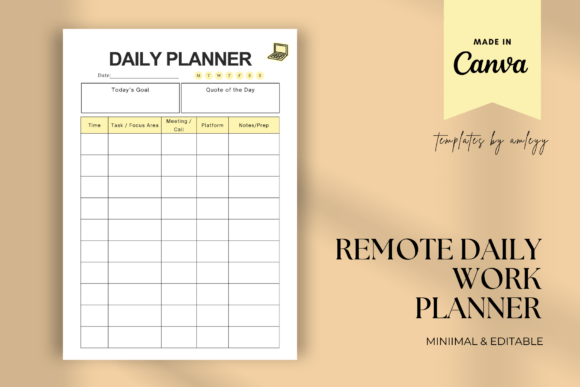
This clean daily planner is designed for people who work from anywhere, whether that is home, a café or a coworking space. It gives each day a simple structure so you start with a plan instead of an inbox. The professional design suits remote workers, virtual assistants and freelancers juggling several clients.
It is an editable Canva template, delivered as a PDF with a direct link. You can customize it, then save it as PNG or PDF to print or use digitally. Reusing the same layout every day helps build a steady work routine.
15. Work from Home Planner Canva Template

Working from home blurs the line between work time and free time, and this planner helps draw it again. It includes a daily schedule, task lists and time-blocking pages. Blocking time for deep work, calls and admin makes the day feel more manageable.
The template is fully editable in Canva with a free or Pro account. It is print-ready and works for digital planning too. It is a practical choice for freelancers who want structure without a large planner.
Digital Planners for Freelancers at a Glance
| Type | Best for | Key features | Format |
|---|---|---|---|
| Client and project planners | Managing several clients at once | Briefs, scope of work, timelines, communication logs, invoices | Printable PDF, Notion template, GoodNotes-ready PDF |
| All-in-one and 2027 planners | Planning the whole year | 2027 calendars, revenue goals, marketing, finance trackers | Printable PDF in several sizes; one hyperlinked PDF |
| Money and tax trackers | Irregular income and tax season | Payments, income and expenses, deductions, mileage | Printable PDF and PNG; editable and Canva options |
| Work-from-home daily planners | Structuring a single workday | Daily schedule, priorities, tasks, time blocks | Editable Canva templates |
What to Look for in Digital Planners for Freelancers
- Start with your biggest pain. If clients pay late, begin with a payment tracker; if projects overrun, start with a project planner.
- Keep client details in one place. A single page per client with contacts, scope and payments saves a lot of searching.
- Track money every week. Irregular income is easier to manage when you record it as it arrives.
- Log deductible expenses as you go. Receipts and mileage are much harder to rebuild at the end of the year.
- Choose the tool you already use. Notion fans will stick with a Notion template, while iPad users may prefer a hyperlinked PDF.
- Separate work and rest. A daily planner with clear work hours helps prevent burnout when you work from home.
FAQ
How do freelancers keep track of clients?
Most freelancers use a simple client list with contact details, project status, deadlines and payment status, either in a planner, a spreadsheet or a tool like Notion. The key is updating it after every call or delivery. A short weekly review keeps the list accurate.
How do I track my income as a freelancer?
Record every payment when it arrives, with the client, date, amount and method. Add your business expenses in the same place so you can see your real profit each month. Keeping copies of invoices and receipts makes tax time much easier.
What should a freelancer track for taxes?
Freelancers usually track income, business expenses, receipts, mileage, home office costs and any tax payments made during the year. Rules differ by country, so the exact list depends on where you live. A tax deduction tracker helps you collect everything in one place.
Is Notion good for freelancers?
Notion works well if you like flexible, linked databases for clients, projects and documents on a computer. If you prefer handwriting or a calmer screen, a printable or tablet planner may suit you better. Many freelancers combine both.
When should a freelancer hire an accountant?
A planner helps you organize records, but it does not replace professional advice. Consider an accountant or tax advisor when your income grows, when you are unsure which expenses you can deduct, or when you need help with registration and tax deadlines in your country.
Final Thoughts
The best digital planners for freelancers make the business side of your work feel lighter, not heavier. Pick one planner for clients or projects and one tracker for money, use them every week, and add more only when you need them. To learn more about working for yourself in general, see this overview of freelancing.





2 Comments