
Digital Planner Stickers: 8 Best Sets for GoodNotes
Digital planner stickers are the quickest way to make a digital planner feel like your own. In this list you will find themed packs with plants, zodiac signs and school motifs, plus functional sets with to-do lists, note boxes and hand-drawn elements. All of them come as transparent PNG files that work in GoodNotes, Notability and other note-taking apps, and most can be printed too.
Quick Picks
- Best for GoodNotes users: Succulent & Cactus Digital Stickers
- Best for astrology lovers: Cosmic Soul Zodiac Stickers
- Best for teachers and students: School Life Sticker Set
- Best for to-do lists: Planner Sticker, to-do List, Notes
- Best for weekly planning: Weekly Daily Digital Planner Sticker Set
Themed Digital Planner Stickers
Themed packs add color and personality to covers, monthly pages and journal spreads.
1. Succulent & Cactus Digital Stickers
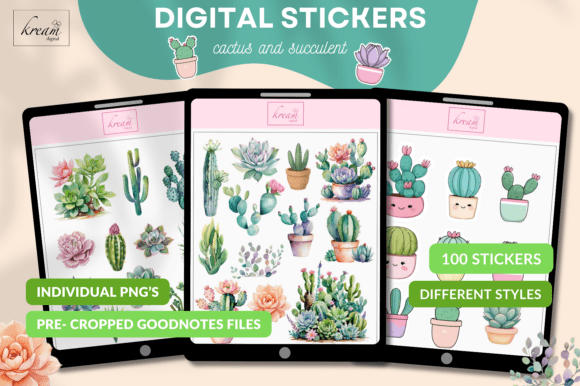
This pack brings 100 succulent and cactus stickers in a range of illustration styles, so a plain weekly spread instantly feels fresh and green. Plant lovers can use them to mark watering days, decorate a gratitude page or simply fill an empty corner. They also suit study notes, where a small plant beside a heading makes long pages easier to scan.
The stickers come in two forms: a sticker book file for GoodNotes with every image already cropped, and individual transparent PNG files at 300 dpi. With the GoodNotes file you copy a sticker with the lasso tool and paste it onto your page, with no cutting out. The PNG files work in Notability and other PDF annotation apps, and they can also be printed on sticker paper.
2. Cosmic Soul Zodiac Stickers

All twelve zodiac signs, from Aries to Pisces, are drawn here as retro emblems inspired by 1970s astrology art. The palette of amber, indigo, cream and terracotta gives each sticker a warm, slightly grainy, vintage-poster feel. They are a natural fit for birthday trackers, monthly cover pages, mood boards and anyone who keeps a moon or astrology journal.
You get 12 separate PNG files at 300 dpi with a transparent background and a soft pre-cut border. Every sign is drawn in the same style, so a full year of monthly pages looks consistent. Drop them into a digital planner or journal app, or print them for a paper planner.
3. Sagittarius Sticker Set

Made for one sign only, this set is a thoughtful pick for a Sagittarius who wants a planner that feels personal. It features archer symbols, centaur art, sun and star motifs and retro lettering in sunset tones of terracotta, coral, cream and navy. The adventurous travel-poster mood also suits travel pages and vision boards.
Inside are more than 60 individual PNG stickers with transparent backgrounds at 300 dpi. That is enough to decorate a whole birthday month, from the monthly cover to the daily pages. The stickers work in GoodNotes, Canva and Procreate, and they print cleanly for scrapbooks and printed journals.
4. School Life Sticker Set

Teachers, college students and homeschool parents can use this small hand-drawn set to give a school planner some personality. It includes seven cheerful illustrations: a notebook, a first-place ribbon, a globe, glasses, a coffee mug, a school board and scissors. The mug and the ribbon work well for marking a long workday or celebrating a finished project.
Each sticker is a separate transparent PNG at 700 dpi, so it stays sharp even when enlarged on an iPad screen. There is also a grouped sheet for Print Then Cut machines and a printable sheet sized 3.5 x 5 inches for sticker paper. The PNG files can be placed straight into GoodNotes or Procreate.
Functional Stickers for To-Do Lists and Notes
Functional stickers give your pages structure: lists, boxes and blocks you can write in.
5. Planner Sticker, to-do List, Notes

Functional stickers save time on busy weeks, and this set focuses on exactly that: to-do lists, note boxes and blocks for daily or weekly planning. Instead of drawing boxes by hand, you place a ready-made list on the page and start writing. It suits a minimal planner as well as a bullet journal that needs a quick, tidy structure.
The set includes 17 transparent PNG files at 300 dpi, plus SVG, EPS, AI and PDF versions. The vector files let you recolor or resize the boxes in a design app if you want them to match your planner theme. You can use the PNG files directly in a digital planner or print them for a paper one.
6. Hand Drawn Daily Planner Sticker Set
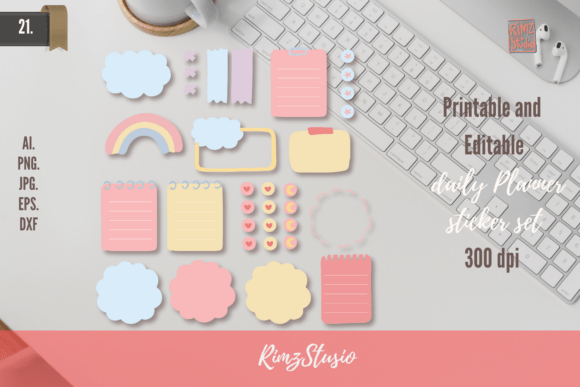
A hand-drawn look makes a digital page feel closer to paper, and this set is built around that idea. It contains 20 sketch-style elements for daily planning that help you organize the day without making the page look rigid. They work especially well for people who like a relaxed, journal-like planner.
Each of the 20 stickers is a transparent PNG at 300 dpi, and the pack also includes a single image with all elements plus EPS and AI files. The combined image is handy for a quick look at everything before you choose. Use the stickers in GoodNotes or Notability, or print them for a bullet journal.
7. Hand Drawn Journal Elements

Journal pages often need small decorative pieces rather than full lists, and this set fills that gap with 17 hand-drawn elements. They are useful for framing a quote, separating sections of a daily log or adding a little detail to a reflection page. Anyone who keeps a gratitude or memory journal will find them easy to work into a spread.
You get 17 individual PNG files at 300 dpi with transparent backgrounds, one PNG with all the elements together, and EPS and AI files. The editable vector versions make it possible to change colors so the stickers match a specific planner theme. The PNG files can be placed into any digital planner app or printed.
8. Weekly Daily Digital Planner Sticker Set

Planning a week and planning a day need slightly different tools, and this set covers both with 21 stickers. You can place larger blocks on a weekly overview and smaller ones on daily pages, so one pack serves your whole planner. It is a practical choice for students, freelancers and anyone who plans on Sunday and checks in every morning.
Every sticker comes as a PNG and an SVG file at 300 dpi, along with EPS, AI and PDF versions. The PNG files go straight into GoodNotes, Notability or Xodo, while the vector files can be resized without losing quality. The PDF is convenient for printing a full sheet at once.
Digital Planner Stickers at a Glance
| Type | Best for | What you get | Format |
|---|---|---|---|
| Themed sticker packs | Decorating covers, monthly pages and journals | Plants, zodiac signs, school motifs | Transparent PNG, one pack with a GoodNotes sticker book |
| Functional sticker sets | Structuring daily and weekly pages | To-do lists, note boxes, hand-drawn elements | Transparent PNG plus SVG, EPS and AI files |
How to Choose Stickers for Your Digital Planner
- Check the app. Transparent PNG files work in almost every note-taking app, while a .goodnotes sticker book is the fastest option for GoodNotes users.
- Look for pre-cropped stickers. They are ready to place on a page, so you do not need to cut out each image yourself.
- Match your planner style. Pick colors that suit your planner theme, or choose a set with vector files so you can recolor it.
- Mix decoration and function. One themed pack and one set of lists or boxes usually cover everything a weekly spread needs.
- Keep a sticker page. Paste your favorites onto one page or into an app sticker library so they are always one tap away.
- Think about printing. If you also keep a paper journal, high-resolution files of 300 dpi or more print cleanly on sticker paper.
FAQ
How do I add stickers to GoodNotes?
If you have PNG files, save them to Photos or Files on your iPad, then use the image tool in GoodNotes to place one on your page and resize it. If you have a GoodNotes sticker book, open it, select a sticker with the lasso tool, copy it and paste it into your planner. Newer versions of GoodNotes also let you save favorite images as elements for quick reuse.
What are pre-cropped digital stickers?
Pre-cropped stickers are images that are already cut out on a transparent background. You can copy and paste them straight onto a page without removing a white background or trimming edges. This saves a lot of time when you decorate a planner every week.
Can you use digital stickers in Notability?
Yes. Notability lets you insert images onto a page, so transparent PNG stickers work well there. Once inserted, you can move, resize and rotate the sticker like any other image.
Can I print digital planner stickers?
Yes, as long as the files have a high enough resolution, usually 300 dpi. Print them on sticker paper and cut them out by hand or with a cutting machine that supports Print Then Cut. This way the same set works for a digital planner and a paper journal.
What file format are digital stickers?
Most digital stickers are PNG files, because the format supports a transparent background. Some sets also include SVG, EPS or AI vector files, which can be resized and recolored in design apps without losing quality.
Final Thoughts
The best digital planner stickers are the ones you will actually reach for every week. Start with one themed pack you love and one functional set for lists and notes, and keep both on a dedicated sticker page in your planner. To learn more about why PNG is the standard format for stickers, see this article on Portable Network Graphics.